Chromium Blog
News and developments from the open source browser project
Chrome 81: Near Field Communications, Augmented Reality, and More
Thursday, February 13, 2020
Protecting users from insecure downloads in Google Chrome
Thursday, February 6, 2020
Update (April 6, 2020): Chrome was originally scheduled to start user-visible warnings on mixed downloads in Chrome 82. These warnings, as well as subsequent blocking, will be delayed by two releases. Console warnings on mixed downloads will begin as scheduled in Chrome 81.
User-visible warnings will start in Chrome 84. The text below has been updated to reflect this change. Developers who are otherwise able to do so are encouraged to transition to secure downloads as soon as possible to avoid future disruption.
Today we’re announcing that Chrome will gradually ensure that secure (HTTPS) pages only download secure files. In a series of steps outlined below, we’ll start blocking "mixed content downloads" (non-HTTPS downloads started on secure pages). This move follows a
plan we announced last year
to start blocking all insecure subresources on secure pages.
Insecurely-downloaded files are a risk to users' security and privacy. For instance, insecurely-downloaded programs can be swapped out for malware by attackers, and eavesdroppers can read users' insecurely-downloaded bank statements. To address these risks, we plan to eventually remove support for insecure downloads in Chrome.
As a first step, we are focusing on insecure downloads started on secure pages. These cases are especially concerning because Chrome currently gives no indication to the user that their privacy and security are at risk.
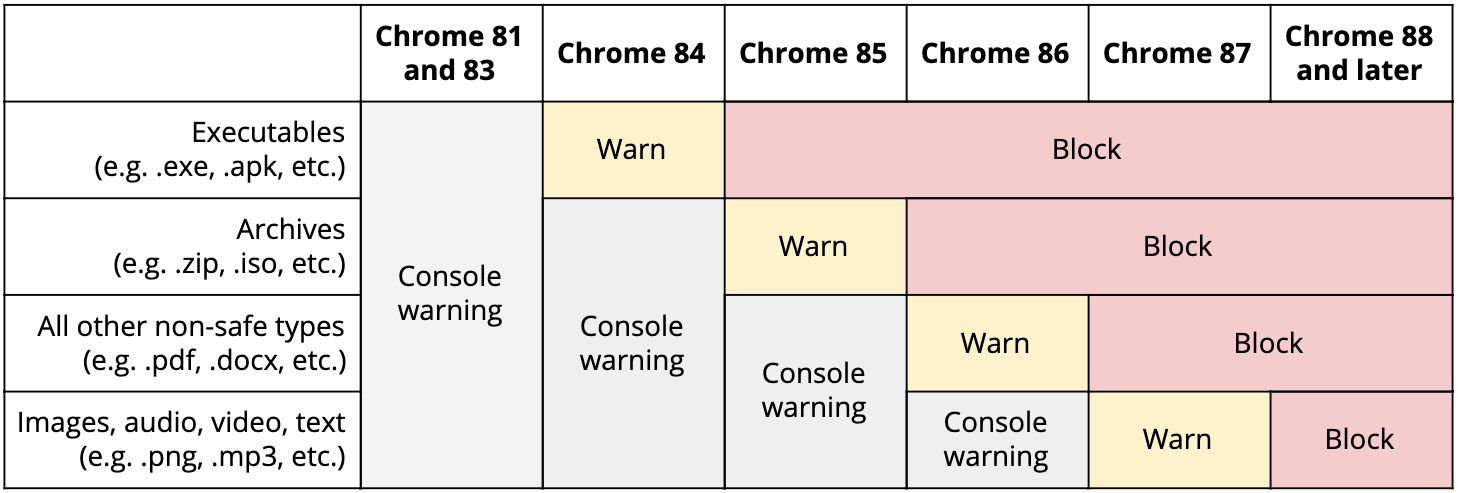
Starting in Chrome 84 (to be released July 2020), Chrome will gradually start warning on, and later blocking, these mixed content downloads. File types that pose the most risk to users (e.g., executables) will be impacted first, with subsequent releases covering more file types. This gradual rollout is designed to mitigate the worst risks quickly, provide developers an opportunity to update sites, and minimize how many warnings Chrome users have to see.
We plan to roll out restrictions on mixed content downloads on desktop platforms (Windows, macOS, Chrome OS and Linux) first. Our plan for desktop platforms is as follows:
In
Chrome 81
(released March 2020) and later:
Chrome will print a
console message
warning about all mixed content downloads.
In
Chrome 84
(released July 2020):
Chrome will
warn
on mixed content downloads of executables (e.g. .exe).
In
Chrome 85
(released August 2020):
Chrome will
block
mixed
content executables
.
Chrome will
warn
on mixed content
archives
(.zip) and
disk images
(.iso).
In
Chrome 86
(released October 2020):
Chrome will
block
mixed content
executables, archives and disk images.
Chrome will
warn on all other mixed content downloads
except image, audio, video and text formats.
In
Chrome 87
(released November 2020):
Chrome will
warn
on mixed content downloads of
images, audio, video, and text
.
Chrome will
block all other mixed content downloads
.
In
Chrome 88
(released January 2021) and beyond, Chrome will block all mixed content downloads.
Example of a potential warning
Chrome will delay the rollout for Android and iOS users by one release, starting warnings in Chrome 85. Mobile platforms have better native protection against malicious files, and this delay will give developers a head-start towards updating their sites before impacting mobile users.
Developers can prevent users from ever seeing a download warning by ensuring that downloads only use HTTPS. In the current version of Chrome Canary, or in Chrome 81 once released, developers can activate a warning on all mixed content downloads for testing by enabling the "Treat risky downloads over insecure connections as active mixed content" flag at
chrome://flags/#treat-unsafe-downloads-as-active-content
.
Enterprise and education customers can disable blocking on a per-site basis via the existing
InsecureContentAllowedForUrls
policy by adding a pattern matching the page requesting the download.
In the future, we expect to further restrict insecure downloads in Chrome. We encourage developers to fully migrate to HTTPS to avoid future restrictions and fully protect their users. Developers with questions are welcome to email us at security-dev@chromium.org.
Posted by Joe DeBlasio, Chrome Security team
Videos with fewer intrusive ads
Wednesday, February 5, 2020
Chrome has always focused on creating the best possible experience for people browsing the web. We have a long history of protecting our users from annoying and harmful experiences—like blocking pop-up windows and warning users if a page has malware. For the last few years, we’ve worked to address a common complaint among Chrome users: annoying, intrusive ads. In 2018, we started removing the ads from websites that continually show intrusive ads that violate industry standards. Google also updated our own advertising offerings to ensure that we’re not selling or serving the kinds of ads that Internet users find the most annoying.
Since then, we’ve seen ad blocking rates in North America and Europe drop significantly in Chrome.
In order to determine which ads are the most intrusive to web experience, we rely on the
Better Ads Standards
which give companies like Google guidance based on feedback from people around the world.
Today, the group responsible for developing the Better Ads Standards, the
Coalition for Better Ads
,
announced
a new set of standards for ads that show during video content, based on research from 45,000 consumers worldwide.
There are many different types of ads that can run before, during, or after a video but a
ccording to the Coalition’s research, there are three ad experiences that people find to be particularly disruptive on video content that is less than 8 minutes long:
Image Source:
Coalition for Better Ads
Long, non-skippable pre-roll ads or groups of ads longer than 31 seconds that appear before a video and that cannot be skipped within the first 5 seconds.
Image Source:
Coalition for Better Ads
Mid-roll ads of any duration that appear in the middle of a video, interrupting the user’s experience.
Image Source:
Coalition for Better Ads
Image or text ads that appear on top of a playing video and are in the middle 1/3 of the video player window or cover more than 20 percent of the video content.
Does this affect my video content?
The Coalition has announced that website owners should stop showing these ads to their site visitors in the next four months. Following the Coalition’s lead, beginning August 5, 2020, Chrome will expand its user protections and stop showing all ads on sites in any country that repeatedly show these disruptive ads.
It’s important to note that YouTube.com, like other websites with video content, will be reviewed for compliance with the Standards. Similar to the previous Better Ads Standards, we’ll update our product plans across our ad platforms, including YouTube, as a result of this standard, and leverage the research as a tool to help guide product development in the future.
If you operate a website that shows ads, you should consider reviewing your site status in the
Ad Experience Report
, a tool that helps publishers to understand if Chrome has identified any violating ad experiences on your site. Starting this week, we’ll update the Ad Experience Report with information to help publishers resolve any issues with these new video standards currently on their site. For more information about this process, you can reference the
Help Center
and
Community Forum
.
Posted by Jason James, Product Manager
SameSite Cookie Changes in February 2020: What You Need to Know
Monday, February 3, 2020
Labels
$200K
1
10th birthday
4
abusive ads
1
abusive notifications
2
accessibility
3
ad blockers
1
ad blocking
2
advanced capabilities
1
android
2
anti abuse
1
anti-deception
1
background periodic sync
1
badging
1
benchmarks
1
beta
83
better ads standards
1
billing
1
birthday
4
blink
2
browser
2
browser interoperability
1
bundles
1
capabilities
6
capable web
1
cds
1
cds18
2
cds2018
1
chrome
35
chrome 81
1
chrome 83
2
chrome 84
2
chrome ads
1
chrome apps
5
Chrome dev
1
chrome dev summit
1
chrome dev summit 2018
1
chrome dev summit 2019
1
chrome developer
1
Chrome Developer Center
1
chrome developer summit
1
chrome devtools
1
Chrome extension
1
chrome extensions
3
Chrome Frame
1
Chrome lite
1
Chrome on Android
2
chrome on ios
1
Chrome on Mac
1
Chrome OS
1
chrome privacy
4
chrome releases
1
chrome security
10
chrome web store
32
chromedevtools
1
chromeframe
3
chromeos
4
chromeos.dev
1
chromium
9
cloud print
1
coalition
1
coalition for better ads
1
contact picker
1
content indexing
1
cookies
1
core web vitals
2
csrf
1
css
1
cumulative layout shift
1
custom tabs
1
dart
8
dashboard
1
Data Saver
3
Data saver desktop extension
1
day 2
1
deceptive installation
1
declarative net request api
1
design
2
developer dashboard
1
Developer Program Policy
2
developer website
1
devtools
13
digital event
1
discoverability
1
DNS-over-HTTPS
4
DoH
4
emoji
1
emscriptem
1
enterprise
1
extensions
27
Fast badging
1
faster web
1
features
1
feedback
2
field data
1
first input delay
1
Follow
1
fonts
1
form controls
1
frameworks
1
fugu
2
fund
1
funding
1
gdd
1
google earth
1
google event
1
google io 2019
1
google web developer
1
googlechrome
12
harmful ads
1
html5
11
HTTP/3
1
HTTPS
4
iframes
1
images
1
incognito
1
insecure forms
1
intent to explain
1
ios
1
ios Chrome
1
issue tracker
3
jank
1
javascript
5
lab data
1
labelling
1
largest contentful paint
1
launch
1
lazy-loading
1
lighthouse
2
linux
2
Lite Mode
2
Lite pages
1
loading interventions
1
loading optimizations
1
lock icon
1
long-tail
1
mac
1
manifest v3
2
metrics
2
microsoft edge
1
mixed forms
1
mobile
2
na
1
native client
8
native file system
1
New Features
5
notifications
1
octane
1
open web
4
origin trials
2
pagespeed insights
1
pagespeedinsights
1
passwords
1
payment handler
1
payment request
1
payments
2
performance
20
performance tools
1
permission UI
1
permissions
1
play store
1
portals
3
prefetching
1
privacy
2
privacy sandbox
4
private prefetch proxy
1
profile guided optimization
1
progressive web apps
2
Project Strobe
1
protection
1
pwa
1
QUIC
1
quieter permissions
1
releases
3
removals
1
rlz
1
root program
1
safe browsing
2
Secure DNS
2
security
36
site isolation
1
slow loading
1
sms receiver
1
spam policy
1
spdy
2
spectre
1
speed
4
ssl
2
store listing
1
strobe
2
subscription pages
1
suspicious site reporter extension
1
TCP
1
the fast and the curious
28
TLS
1
tools
1
tracing
1
transparency
1
trusted web activities
1
twa
2
user agent string
1
user data policy
1
v8
6
video
2
wasm
1
web
1
web apps
1
web assembly
2
web developers
1
web intents
1
web packaging
1
web payments
1
web platform
1
web request api
1
web vitals
1
web.dev
1
web.dev live
1
webapi
1
webassembly
1
webaudio
3
webgl
7
webkit
5
WebM
1
webmaster
1
webp
5
webrtc
6
websockets
5
webtiming
1
writable-files
1
yerba beuna center for the arts
1
Archive
2026
Mar
2025
Oct
Jul
Jun
May
Jan
2024
Dec
Aug
Jun
May
Apr
Mar
Feb
2023
Nov
Oct
Sep
Aug
Jun
May
Apr
Feb
2022
Dec
Sep
Aug
Jun
May
Apr
Mar
Feb
Jan
2021
Dec
Nov
Oct
Sep
Aug
Jul
Jun
May
Apr
Mar
Feb
Jan
2020
Dec
Nov
Oct
Sep
Aug
Jul
Jun
May
Apr
Mar
Feb
Jan
2019
Dec
Nov
Oct
Sep
Aug
Jul
Jun
May
Apr
Mar
Feb
Jan
2018
Dec
Nov
Oct
Sep
Aug
Jul
Jun
May
Apr
Mar
Feb
Jan
2017
Dec
Nov
Oct
Sep
Aug
Jul
Jun
May
Apr
Mar
Feb
Jan
2016
Dec
Nov
Oct
Sep
Aug
Jun
May
Apr
Mar
Feb
Jan
2015
Dec
Nov
Oct
Sep
Aug
Jul
Jun
May
Apr
Mar
Feb
Jan
2014
Dec
Nov
Oct
Sep
Aug
Jul
Jun
May
Apr
Mar
Feb
Jan
2013
Dec
Nov
Oct
Sep
Aug
Jul
Jun
May
Apr
Mar
Feb
Jan
2012
Dec
Nov
Oct
Sep
Aug
Jul
Jun
May
Apr
Mar
Feb
Jan
2011
Dec
Nov
Oct
Sep
Aug
Jul
Jun
May
Apr
Mar
Feb
Jan
2010
Dec
Nov
Oct
Sep
Aug
Jul
Jun
May
Apr
Mar
Feb
Jan
2009
Dec
Nov
Sep
Aug
Jul
Jun
May
Apr
Mar
Feb
Jan
2008
Dec
Nov
Oct
Sep
Feed
Follow @ChromiumDev
Give us feedback in our
Product Forums
.