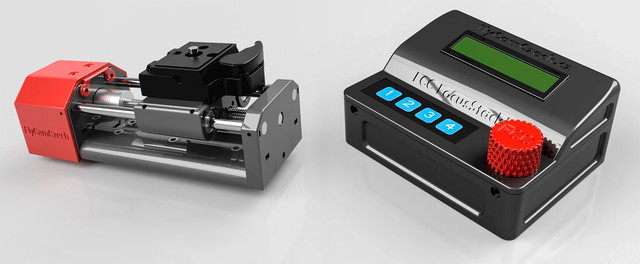
(Born4Flight | FlyCamCzech | Jakub Ešpandr)
The FlyCamCzech FOCUSpilot is an Arduino-based system designed for automated focus stacking photography. This device controls a stepper motor to move a camera lens through different focus positions, automatically triggering the camera shutter at each position to capture a series of images for focus stacking. Perfect for macro and close-up photography where extended depth of field is required.
- Automated Focus Stacking: Automatically moves through focus positions and triggers camera capture
- Professional Preset System: Dedicated modes for Macro Rail and Microscope applications
- Enhanced Algorithms: Mode-specific focus stacking algorithms optimized for different applications
- AutoSave Functionality: Automatic saving of settings when enabled for seamless operation
- Mirror Lock Support: Vibration-free photography with configurable mirror lock timing
- Auto Return Function: Automatic return to start position after stacking completion
- Manual Control: Manual forward/backward movement with position memory
- Dynamic Motor Control: Automatic speed adjustment based on depth of field and stepping mode
- Configurable Parameters: Adjustable depth of field (DoF), step size, timing, and trigger settings
- LCD Interface: 16x2 LCD display with rotary encoder navigation
- Keypad Control: 4-button keypad for quick manual operations
- EEPROM Storage: Settings are saved to non-volatile memory with separate preset storage
- Bidirectional Operation: Support for both forward and backward focus stacking sequences
- Emergency Stop: Quick stop functionality using encoder button
- Progress Monitoring: Real-time display with remaining time estimation
- HiRes Mode: High-resolution stepping (1/32 microstepping) for precise positioning
- Direct Preset Selection: Quick access to Microscope and Rail presets
- Smart Unit Display: Automatic unit display (nm/μm) based on selected mode
- Relay Test: Automatic camera trigger relay verification on startup
- Arduino board (compatible with Arduino IDE)
- 16x2 LCD display with I2C interface (address 0x27)
- Rotary encoder (CLK, DT, SW pins)
- 4-button keypad
- Stepper motor driver
- Relay module for camera trigger
- Stepper motor
- Wire.h – I2C communication
- LiquidCrystal_I2C_Menu.h – LCD menu system
- EEPROM.h – Non-volatile memory storage
- Keypad.h – Keypad input handling
- EEPROMTyped.h – Typed EEPROM operations
| Component | Pin | Description |
|---|---|---|
| Rotary Encoder | 2 | CLK |
| Rotary Encoder | 4 | DT |
| Rotary Encoder | 3 | SW (Button) |
| Keypad Row | 5 | Row pin |
| Keypad Columns | 7, 6, 9, 8 | Column pins |
| Stepper Motor | 13 | Step pin |
| Stepper Motor | 12 | Direction pin |
| Stepper Motor | 17 | Enable pin |
| Microstep Pins | 16, 15, 14 | MS1, MS2, MS3 |
| Camera Trigger | 10 | Relay trigger |
- Install Libraries: Install the required Arduino libraries through the Library Manager
- Connect Hardware: Wire the components according to the pin diagram above
- Upload Code: Upload the
fccFS-PRO_1.2.0.inofile to your Arduino board - Power On: Connect power and initialize the system
The project includes a Python script (ino2cpp.py) that converts Arduino .ino files to standard C++ format:
- Python 3.x (3.6+ recommended for f-strings)
- tkinter (usually included with Python, see requirements.txt for details)
- No external dependencies - uses only Python standard library modules
- Check requirements: Review
requirements.txtfor system-specific notes - Install tkinter (if needed):
- Ubuntu/Debian:
sudo apt-get install python3-tk - macOS/Windows: Usually included with Python installation
- Ubuntu/Debian:
- Verify installation: Run
python -c "import tkinter"to test
- Automatic Conversion: Converts
.inofiles to.cppand.hfiles - Function Prototypes: Automatically extracts and generates function declarations
- Library Detection: Scans and copies required Arduino libraries
- GUI Interface: User-friendly graphical interface for file selection
- Deep Library Scan: Searches multiple Arduino library locations
- Run the script:
python ino2cpp.py - Select .ino file: Browse to your Arduino sketch
- Choose output directory: Select where to save converted files
- Convert: Click "Convert and export" to generate files
fccFS-PRO_1.2.0.cpp: Main implementation file with all codefccFS-PRO_1.2.0.h: Header file with function prototypes- Library copies: Required Arduino libraries copied to output directory
- Better IDE Support: Standard C++ format works with any C++ IDE
- Code Analysis: Enables advanced code analysis and refactoring tools
- Version Control: Better diff tracking and merge capabilities
- Documentation: Automatic function prototype generation
- Integration: Easier integration with larger C++ projects
- 15 Pre-configured Objectives across 3 carousels:
- Carousel 1 (small): 2.5x, 3.2x, 6.3x, 10x, 16x
- Carousel 2 (apo): 6.3x, 16x, 40x, 63x, 100x
- Carousel 3 (GF): 10x, 20x, 40x, 63x, 100x
- One-Click Loading - Instant preset selection with pre-configured DOF values
- Individual EEPROM Storage - Each objective has dedicated memory location
- Photo Count Mode - Set number of photos instead of distance
- Dynamic Step Calculation - Automatically calculates optimal step size
- Enhanced Progress Display - Real-time photo count and time remaining
- Dedicated Test Menu - Comprehensive testing options
- Motor Movement Testing - Verify forward/backward operation
- Camera Trigger Testing - Test shutter release functionality
- Microscope-Only Platform - Optimized specifically for microscope workflows
- Streamlined Interface - Reduced complexity for specialized use cases
- Automated Focus Stacking - Precise motor control for focus stacking sequences
- Dual DOF System - Small and big increment options for different workflows
- Auto Return - Automatic return to start position after stacking
- Mirror Lock - Camera mirror lock functionality for vibration reduction
- Auto Save - Automatic EEPROM saving of settings
- Rotary Encoder - Intuitive menu navigation and value adjustment
- Keypad Input - Quick access to functions and numeric input
- LCD Display - Real-time status and menu information
- Stepper Motor Control - Precise microstep positioning
- Motor Speed - Adjustable from 5-1000ms for optimal performance
- Microstep Settings - Configurable MS1, MS2, MS3 for precision
- DOF Ranges - Extended ranges for both small and big increments
- Objective Presets - 15 pre-configured microscope objectives
- testSHOT: Trigger camera shutter manually
- RUN: Automated focus stacking sequences
- RUN Forward: Execute forward focus stacking
- um/step small: Set precise depth of field for detailed work
- um/step big: Set extended depth of field for faster stacking
- Photos: Set number of photos for photo-based stacking
- RUN by Photos: Execute stacking based on photo count
- RUN dist: Execute stacking based on distance
- RUN Backward: Execute backward focus stacking
- um/step small: Set precise depth of field
- um/step big: Set extended depth of field
- RUN: Execute backward stacking
- RUN Forward: Execute forward focus stacking
- PREFERENCES: System configuration
- SET Objectives: Configure objective presets
- Carousel 1 (small): 2.5x, 3.2x, 6.3x, 10x, 16x
- Carousel 2 (apo): 6.3x, 16x, 40x, 63x, 100x
- Carousel 3 (GF): 10x, 20x, 40x, 63x, 100x
- Presets: Quick objective selection
- Motor Speed: Adjust motor timing (5-1000ms)
- Microsteps: Configure MS1, MS2, MS3 settings
- Auto Return: Enable/disable automatic return
- Mirror Lock: Enable/disable mirror lock
- Auto Save: Enable/disable automatic saving
- SET Objectives: Configure objective presets
- TEST: System testing and validation
- testStep: Test motor movement
- testSHOT: Test camera trigger
- Speed Range: 5-1000ms (extended from previous versions)
- Microstep Configuration: MS1, MS2, MS3 for precision control
- Direction Control: Forward/backward movement
- Microscope Normal: 10-1800nm
- Microscope HiRes: 5-1000nm
- Microscope Normal: 10-3000nm
- Microscope HiRes: 5-2000nm
- 15 Pre-configured objectives with optimized DOF values
- Individual EEPROM storage for each objective
- Quick selection from 3 carousels
- VERSION: System information
- model: fccFS2 PRO
- by FlyCamCzech
- version 1.2.0
-
- Aug. 2024
FOCUSpilot/
├── fccFS-PRO_1.2.0/
│   └── fccFS-PRO_1.2.0.ino    # Main Arduino sketch (current version)
├── fccFS-PRO_1.2.0.cpp        # Converted C++ implementation file
├── fccFS-PRO_1.2.0.h          # Converted C++ header file
├── ino2cpp.py                 # Arduino to C++ conversion script
├── requirements.txt           # Python dependencies for conversion script
├── libraries/                  # Required Arduino libraries
│   ├── EEPROM/                # EEPROM management
│   ├── EEPROMTyped-1.0.0/     # Typed EEPROM operations
│   ├── Keypad/                # Keypad input handling
│   ├── LiquidCrystal_I2C_Menu-master/  # LCD menu system
│   └── Wire/                  # I2C communication
├── CHANGELOG.md               # Version history and changes
└── README.md                  # This documentation
.ino: Original Arduino sketch format (for Arduino IDE).cpp: Standard C++ implementation file (for advanced development).h: C++ header file with function prototypes (for code analysis)
- Select Objective: Choose from 15 pre-configured objectives
- Set Parameters: Configure DOF, speed, and microstep settings
- Position: Move to start position using manual controls
- Execute: Run automated focus stacking sequence
- Return: Automatic return to start position (if enabled)
- Set Photo Count: Specify number of photos desired
- Calculate Steps: System automatically determines optimal step size
- Execute: Run stacking based on photo count
- Monitor Progress: Real-time display of photos taken and remaining
- Access SET Objectives: Navigate to objective configuration menu
- Select Carousel: Choose from 3 carousels (small, apo, GF)
- Configure DOF: Set optimal depth of field for each objective
- Save Settings: Automatic EEPROM storage of configurations
- Arduino Board: Compatible with Arduino Mega or similar
- Display: I2C LCD display (16x2 or 20x4)
- Motor: Stepper motor with driver
- Input: Rotary encoder and 4x4 keypad
- Trigger: Relay for camera shutter control
- Arduino IDE: Version 1.8.x or newer
- Libraries: EEPROM, Keypad, LiquidCrystal_I2C_Menu, Wire
- Memory: ~60KB program space, ~2KB RAM
- EEPROM: 60+ addresses for comprehensive storage
- Motor Speed: 5-1000ms step timing
- Precision: Microstep control (MS1, MS2, MS3)
- Storage: 15 objective presets with individual EEPROM storage
- Menu System: 80+ menu options with hierarchical navigation
This project is licensed under the Non-Commercial Public License (NCPL v1.0)
© 2025 Jakub Ešpandr - Born4FLight, FlyCamCzech
See the LICENSE file for full terms.
- Built with ❤️ using Arduino and open-source libraries
- For support and updates, visit: WWW.FlyCamCzech.EU/FOCUSpilot