Lightweight notification module for websites
Install package
npm install codex-notifier --saveyarn add codex-notifierconst notifier = require('codex-notifier');import notifier from 'codex-notifier';
import {ConfirmNotifierOptions, NotifierOptions, PromptNotifierOptions} from 'codex-notifier';Module has only one public method — show.
You should pass there object with notification properties
message— notification message (can contains HTML)type— type of notification:alert,confirmorprompt.Alertby defaultstyle— just add'cdx-notify--' + styleclass. We have some default styles:successanderrortime— notification expire time in ms. Only foralertnotifies expires (8s by default)
okText— text for confirmation button (Confirm by default)cancelText— text for cancel button (Cancel by default)okHandler— fires when Confirm button was pressedcancelHandler— fires when Cancel button was pressed or notification was closed
okText— text for submit button (Ok by default)okHandler— fires when submit button was pressed. Gets input's value as a parametercancelHandler— fires when notification was closedplaceholder— input placeholderdefault— input default valueinputType— type of input (text by default)
notifier.show({
  message: 'Refresh the page'
})
notifier.show({
  message: 'Message was sent',
  style: 'success',
  time: 5000
})
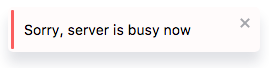
notifier.show({
  message: 'Sorry, server is busy now',
  style: 'error'
})
notifier.show({
  message: 'Delete account?',
  type: 'confirm',
  okText: 'Yes',
  cancelText: 'Oh, wait',
  okHandler: account.delete
})
notifier.show({
  message: 'Enter your email',
  type: 'prompt',
  okText: 'Enter',
  okHandler: checkEmail,
  inputType: 'email',
  placeholder: 'team@ifmo.su'
})
You can easily customize notifications appearance. Read more about it here