A browser-based 3D flight simulator over real-world terrain. Fly anywhere on Earth using elevation data from AWS Terrarium and multiple texture modes (satellite, road map, SAR radar, elevation contours) — all rendered in real time with Three.js WebGPU. No install, no build step, no API key.

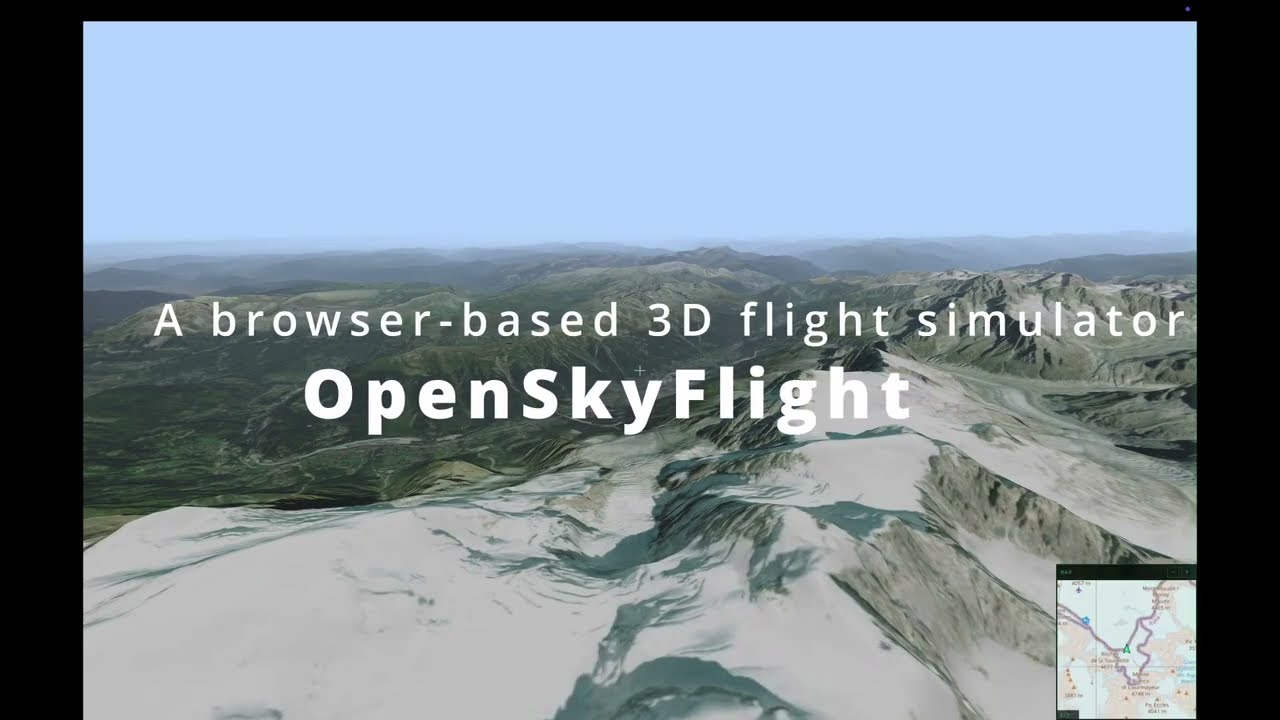


- Real-world elevation — decoded from AWS Terrarium PNG tiles on the GPU via TSL
positionNode - 4 texture modes — Satellite imagery, Road map, SAR radar, and Elevation contour lines — cycle with
Tor pick from the control panel - Hi-Res mode (zoom 18) — press
Rto toggle upsampled elevation with zoom-18 satellite textures for sharper close-up detail. Hi-res tiles are concentrated at the view center and fade concentrically toward the periphery. Best suited for static or slow-moving views; fast flight may cause temporary pixelation while high-zoom tiles load - Adaptive LOD — quadtree subdivision based on camera distance, with concentric view-center weighting for hi-res zoom levels
- Rafale aircraft — 3D GLTF model with retracted landing gear, animated banking and pitch, chase camera (30 m behind)
- Cockpit / chase toggle — press
Vto switch between first-person cockpit (roll applied to horizon) and third-person chase view - Flight simulator controls — 6-DOF camera with pointer lock, banking, pitch/yaw, full 360° looping
- Aircraft-style HUD — compass, artificial horizon, altimeter (MSL + AGL), speed indicator
- MFD cockpit panel — auto-hiding control panel with military flight display aesthetics
- OSM minimap — real-time 2D map overlay with airplane marker and independent zoom
- Flight plan system — record waypoints, save/load flight plans, and engage autopilot to follow a path automatically
- Local tile cache — transparent caching proxy, pre-download tiles for offline flight
- Atmospheric sky, clouds & fog — procedural sky with configurable sun position, animated cloud layer, and exponential distance fog
- Dynamic resolution scaling — adaptive pixel ratio based on frame time to maintain smooth performance
- Built-in benchmark — automated camera path with FPS/GPU timing, metrics recording, and baseline comparison
- Toast notifications — non-blocking user feedback for search results and errors
- Centralized logging — in-app log panel with level control (DEBUG/INFO/WARN/ERROR)

Third-person chase camera following the Rafale over satellite-textured terrain.
No dependencies needed to run the app. Start the dev server:
node scripts/serve.jsThen open http://localhost:3000 in your browser.
The server acts as a caching proxy for map tiles — every tile downloaded from the internet is automatically saved to cache/ on disk, so it's never fetched twice.
Install dev dependencies for linting and formatting:
npm installAvailable scripts:
| Command | Description |
|---|---|
npm run dev |
Start the dev server |
npm run lint |
Run ESLint |
npm run lint:fix |
Run ESLint with auto-fix |
npm run format |
Format all files with Prettier |
npm run format:check |
Check formatting without modifying files |
| Input | Action |
|---|---|
| Click the viewport | Lock the mouse pointer |
| Mouse | Look around (yaw / pitch) |
W / S or ↑ / ↓ |
Move forward / backward (Z / S on AZERTY) |
A / D or ← / → |
Strafe left / right (Q / D on AZERTY) |
T |
Cycle texture mode (Satellite / Road map / SAR / Elevation) |
V |
Toggle cockpit / chase view |
H |
Toggle HUD |
M |
Toggle minimap |
I |
Toggle info & help overlay |
R |
Toggle Hi-Res mode (zoom 18) — best for static views |
X |
Toggle debug tile overlay |
B |
Start / stop benchmark |
Shift+B |
Store last benchmark as baseline |
N |
Start / stop flight plan recording |
Shift+N |
Clear current flight plan |
P |
Add waypoint (while recording) |
L |
Open / close flight plan menu |
G |
Engage / disengage autopilot |
1–9 |
Select flight plan from menu |
Esc |
Release pointer lock / close menu |
Keyboard layouts: Flight controls (WASD) use physical key positions, so they map to ZQSD on AZERTY keyboards. All other shortcuts use the character printed on the key and work identically on any layout.
Use the right-side control panel to search locations, load terrain, and select texture mode.
The terrain engine relies on three-tile, a lightweight Three.js tile map library. We vendor a patched fork (0.11.8-osf) in vendor/three-tile/ with custom LOD enhancements (concentric view-center weighting, removal hysteresis).
If you modify the sources, rebuild the bundle:
cd vendor/three-tile
npm run build:lib
This produces vendor/three-tile/packages/lib/dist/three-tile-osf.js, which the app imports via import map — no other change needed.
Enter coordinates (or search a place name) in the control panel, then click Load Terrain. The app fetches elevation data from AWS Terrarium and overlays one of four texture modes, switchable at runtime with T or the control panel.
Default location: Mont Blanc (45.8326°N, 6.8652°E).
| Satellite | Road map |
|---|---|
 |
 |
| SAR radar | Elevation lines |
 |
 |
Top-left: ESRI satellite imagery. Top-right: OpenStreetMap road map. Bottom-left: SAR radar style (black sky, side-looking light, grey speckle grain). Bottom-right: elevation contour lines (cyan lines on dark background).
- Elevation — Terrarium PNG tiles (AWS S3) are decoded into heightmaps on the GPU via a TSL
positionNodeshader (R×256 + G + B/256 − 32768meters) - LOD system — three-tile's quadtree subdivision splits tiles near the camera into 4 children at higher zoom; a concentric weighting concentrates hi-res tiles (zoom 16–18) at the view center while distant and peripheral tiles stay coarse
- Textures — Four modes: Satellite (ESRI) and Road map (OSM) fetch raster tiles on demand; SAR radar and Elevation contours are GPU-generated via TSL shaders
- Caching — A Node.js proxy intercepts all
/tiles/requests: serves from disk on hit, fetches upstream on miss, caches for next time
The dev server (scripts/serve.js) acts as a transparent caching proxy. When the browser requests a tile:
- Cache hit — the file exists in
cache/, served instantly from disk (X-Cache: HIT) - Cache miss — fetched from the remote server, saved to
cache/, then returned (X-Cache: MISS)
Every tile is downloaded at most once. Subsequent sessions, or navigating back to a previously visited area, will always load from the local cache.
cache/
  terrarium/        ← elevation tiles (AWS Terrarium)
  osm/              ← map textures (OpenStreetMap)
  satellite/        ← satellite imagery (ESRI)
The
cache/directory is listed in.gitignoreand should not be committed — it can be regenerated at any time.
├── index.html                 Entry point (UI structure, import map)
├── css/main.css               Stylesheet (CSS custom properties)
├── js/
│   ├── app.js                 Orchestrator: init, input bindings, render loop
│   ├── aircraft/              Rafale GLTF model loading & animation
│   ├── atmosphere/            Procedural sky, cloud layer, fog
│   ├── benchmark/             Automated perf testing & baseline comparison
│   ├── camera/                Flight controller (6-DOF), chase camera, springs
│   ├── constants/             Shared constants (camera, HUD, physics, terrain…)
│   ├── flightplan/            Waypoint recording, flight plan interpolation, autopilot
│   ├── geo/                   Tile math, elevation/texture providers, fetch limiter
│   ├── input/                 Keyboard dispatch (e.code for flight, e.key for actions)
│   ├── rendering/             Adaptive resolution scaling
│   ├── scene/                 Renderer, scene, camera & lights factory
│   ├── terrain/               Real-world terrain manager (three-tile integration)
│   ├── ui/                    HUD instruments, flight plan menu, minimap, MFD panel
│   └── utils/                 Reactive config, logger
├── assets/
│   ├── models/                3D models (Rafale GLTF)
│   └── flightplans/           Saved flight plan JSON files
├── scripts/
│   ├── serve.js               Dev server with caching tile proxy
│   └── prefetch-tiles.js      Bulk tile downloader for offline use
├── vendor/three-tile/         Vendored three-tile (0.11.8-osf) with concentric LOD
├── docs/screenshots/          README screenshots
├── benchmarks/                Benchmark result JSON files
└── cache/                     Local tile cache (git-ignored)
- Three.js v0.183 (WebGPU build) — 3D rendering with TSL shaders (loaded via CDN, no install)
- three-tile (0.11.8-osf) — geographic tile management with patched concentric LOD
- Canvas 2D — HUD instrument overlay, hi-res badge, and minimap
- three/examples — Sky — procedural atmospheric sky and sun
- AWS Terrarium Tiles — elevation data (zoom 0–15, upsampled to 18 in hi-res mode)
- OpenStreetMap — road map textures
- ESRI World Imagery — satellite imagery (up to zoom 18+)
- Node.js — dev server with transparent caching tile proxy and offline prefetch script
- ES modules + import maps — no bundler needed
- ESLint 9 + Prettier — code quality and formatting (dev only)
OpenSkyFlight uses WebGPU for rendering. Browser support varies significantly because each engine relies on a different backend:
| Browser | Backend | Status | Notes |
|---|---|---|---|
| Chrome & Chromium-based | Dawn (C++) | Very Good | Stable WebGPU since 2023, most mature implementation |
| Firefox | wgpu (Rust) | Very Good | ~90% spec coverage, may have minor rendering differences |
| Safari | WebKit + Metal | Very Bad | WebGPU enabled by default since Safari 26 (2025); visual artefacts, flickering, and performance instability due to Metal-specific constraints |
Even with identical WGSL shaders, each browser compiles and optimizes them through a different pipeline, which can produce subtle rendering differences. For the best experience, use Chrome or a Chromium-based browser.
OpenSkyFlight does not bundle or redistribute any map data. All tiles are fetched at runtime by the user's browser through a local caching proxy. Users are responsible for complying with each provider's terms of use.
Elevation tiles are sourced from the Mapzen Terrain Tiles open dataset hosted on AWS S3. The underlying data comes from multiple public domain and open data sources including USGS 3DEP, SRTM, GMTED2010, and others.
- License: mixed open data — mostly public domain (US government), some CC-BY (Australia), Open Government Licence (Canada)
- Attribution: terrain data courtesy of Mapzen. See the full attribution guide for regional sources.
- No API key required. No rate limit.
Map tiles are fetched from the OpenStreetMap tile server.
- License: map data is available under the Open Database License (ODbL). Tile images are licensed under CC-BY-SA 2.0.
- Attribution: © OpenStreetMap contributors.
- Usage policy: the public tile server is intended for light, interactive use. See the OSM Tile Usage Policy for details. For heavy or production use, consider a self-hosted tile server or a commercial provider.
Satellite tiles are fetched from the Esri World Imagery basemap service.
- License: proprietary — governed by the Esri Terms of Use. Non-commercial use is permitted with attribution. Commercial use requires a paid Esri license.
- Attribution: powered by Esri. Sources: Esri, Maxar, Earthstar Geographics, and the GIS User Community.
- Users consuming this data are responsible for complying with Esri's terms.
The aircraft model was created by pjedvaj and downloaded from CGTrader.
- License: Royalty Free License
- Original format: Cheetah3D (.jas), converted to GLTF
Place name search uses the Nominatim geocoding API.
- License: results are OpenStreetMap data under ODbL.
- Attribution: © OpenStreetMap contributors.
- Usage policy: max 1 request/second, no bulk geocoding. See the Nominatim Usage Policy.
This project's source code is licensed under MIT. Map data, imagery, and elevation data are subject to their respective licenses listed above.