


faasd is the same OpenFaaS experience and ecosystem, but without Kubernetes. Functions and microservices can be deployed anywhere with reduced overheads whilst retaining the portability of containers and cloud-native tooling.
- is a single Golang binary
- can be set-up and left alone to run your applications
- is multi-arch, so works on Intel
x86_64and ARM out the box - uses the same core components and ecosystem of OpenFaaS
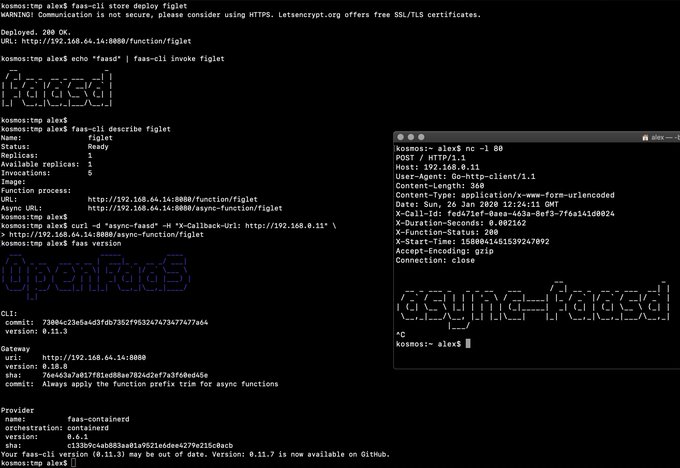
Demo of faasd running in KVM
- faasd - itself, and its faas-provider for containerd
- Prometheus
- OpenFaaS Gateway & UI
- OpenFaaS queue-worker for NATS
- NATS for asynchronous processing and queues
You'll also need:
You can use the standard faas-cli along with pre-packaged functions from the Function Store, or build your own using any OpenFaaS template.
You can run this tutorial on your Raspberry Pi, or adapt the steps for a regular Linux VM/VPS host.
To use private image repos, ~/.docker/config.json needs to be copied to /var/lib/faasd/.docker/config.json.
If you'd like to set up your own private registry, see this tutorial.
See here for manual / developer instructions
faas loginfaas upfaas listfaas describefaas deploy --update=true --replace=falsefaas invoke --asyncfaas invokefaas rmfaas store list/deploy/inspectfaas versionfaas namespacefaas secret
Scale from and to zero is also supported. On a Dell XPS with a small, pre-pulled image unpausing an existing task took 0.19s and starting a task for a killed function took 0.39s. There may be further optimizations to be gained.
Other operations are pending development in the provider such as:
faas logs- to stream logs on-demand for a known functionfaas auth- for the OAuth2 and OIDC integration
Pending:
- Add support for using container images in third-party public registries
- Add support for using container images in private third-party registries
- Monitor and restart any of the core components at runtime if the container stops
- Bundle/package/automate installation of containerd - see bootstrap from k3s
- Provide ufw rules / example for blocking access to everything but a reverse proxy to the gateway container
- Provide simple Caddyfile example in the README showing how to expose the faasd proxy on port 80/443 with TLS
Done:
- Provide a cloud-config.txt file for automated deployments of
faasd - Inject / manage IPs between core components for service to service communication - i.e. so Prometheus can scrape the OpenFaaS gateway - done via
/etc/hostsmount - Add queue-worker and NATS
- Create faasd.service and faasd-provider.service
- Self-install / create systemd service via
faasd install - Restart containers upon restart of faasd
- Clear / remove containers and tasks with SIGTERM / SIGINT
- Determine armhf/arm64 containers to run for gateway
- Configure
basic_authto protect the OpenFaaS gateway and faasd-provider HTTP API - Setup custom working directory for faasd
/var/lib/faasd/ - Use CNI to create network namespaces and adapters