===========================================================
An extended SCD30 library based on the SparkFun SCD30 CO2 Sensor Library, see information below
- tested on UNO R4 WiFI with Wire (5V): Works correct unmodified.
- tested on UNO R4 WIFI with QWICC/Wire1 (3v3) : WORKS but needs more time to warm up /get stable
- added option autoCalibrate to begin() to enable disable auto calibration (contribution of jhengstermann)
- begin(TwoWire &wirePort = Wire, bool m_begin = true, boolean autoCalibrate = true);
- wirePort : I2C channel to use. Wire by default.
- m_begin : if true will start measurement every 2 seconds. True / start by default.
- autoCalibrate : if true will enable or false disable autocalibrate at begin. True / Enable ASC by default.
- solved a conflict with ByteToFloat when using SPS30 at the same time
- Update in readmeasurement to translate byte to float. It did not work on Arduino. Tested on Uno, Artemis Apollo3, ESP32
- added example4 to manual input temperature offset and see impact.
- SECOND UPDATE IN OCTOBER
- Added example5 to work with Sparkfun LCD
- update to example4 to set and calibrate temperature offset
Changes based on Datasheet May 2020
- added functions : getForceRecalibration, getMeasurementInterval, getTemperatureOffset, getAltitudeCompensation, getFirmwareLevel
- updated the keywords.txt file
- added example14 to demonstrate the new functions
- A number of library enhancements
- updated sketches and library where needed
Changes:
- Added option in examples 10 and 13 to set BME280 I2C address. (some use 0x76 instead of 0x77)
- Added SoftWire (a port of the ESP8266 I2C library) for ESP32 (which does NOT support clockstretching)
- Removed StartSingleMeasurement as that is not working in the SCD30 as it should.
- Added option to begin() to disable starting measurement. (needed in case one wants to read serial number)
- updated the keywords.txt file
- updated sketches and library where needed
Changes:
- Added ESP8266 board detection in begin() to support the ESP8266 clockstretching
- Added setting debug messages
- Added obtaining serial number of SCD30
- Added StopMeasurement
- Added StartSingleMeasurement (removed February 2019 as it IS unstable)
- Added GetTemperature in Fahrenheit
- Added CRC checks on different places in de driver
- Updated existing sketches fom Sparkfun to new library
- Added new sketches : Example 10: combined read with BME280 Example 11: Set ESP8266 as Access Point and read SCD30 in browser Example 12: Set ESP8266 as WIFI server and read SCD30 in browser
More work to be follow on connecting / comparing with other sensors and document the learnings.
check for updated datasheet and information on
============= ORIGINAL INFORMATION FROM SPARKFUN ===========================
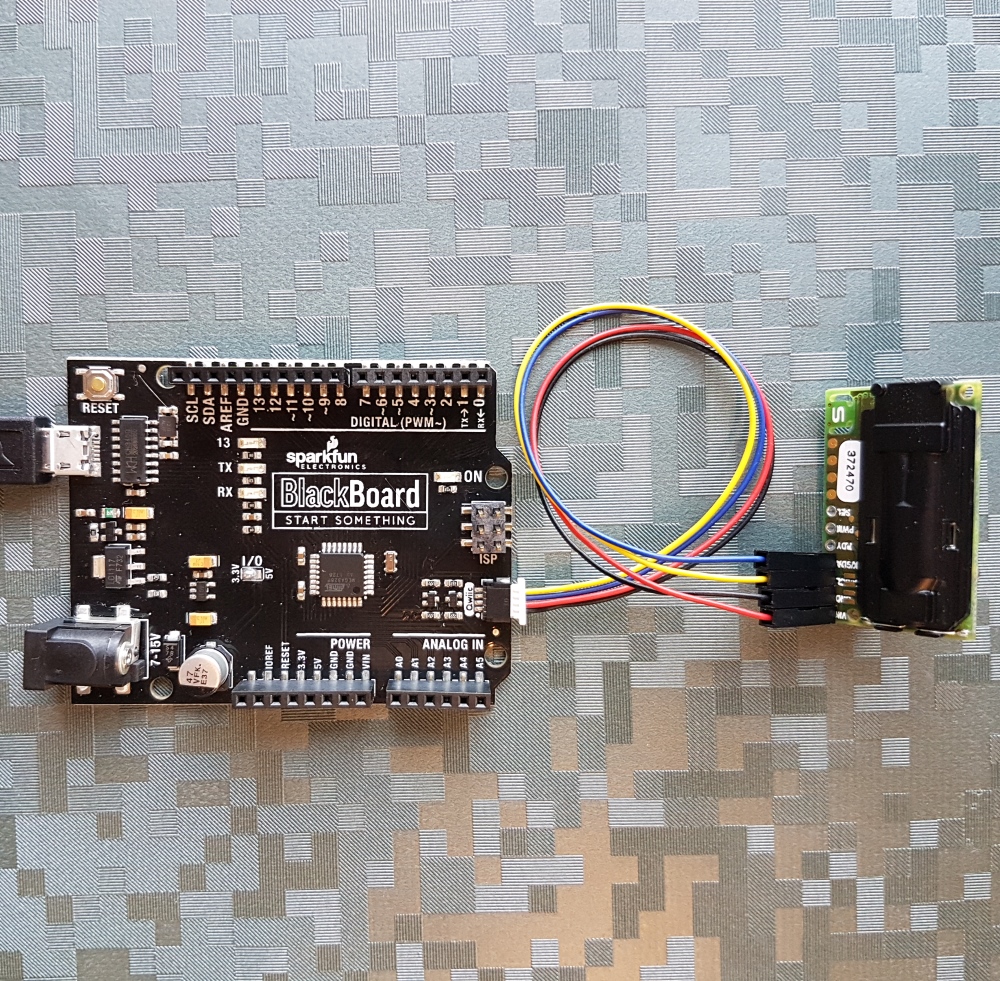
SparkX CO₂ Humidity and Temperature Sensor - SCD30 (SPX-14751)
The SCD30 from Sensirion is a high quality NDIR based CO₂ sensor capable of detecting 400 to 10000ppm with an accuracy of ±(30ppm+3%). In order to improve accuracy the SCD30 has temperature and humidity sensing built-in, as well as commands to set the current altitude.
We've written an Arduino library to make reading the CO₂, humidity, and temperature very easy. It can be downloaded through the Arduino Library manager: search for 'SparkFun SCD30'. We recommend using a Qwiic Breadboard Cable to connect the SCD30 to a Qwiic compatible board. The YeLLow wire goes in the SCL pin. The SCD30 also supports a serial interface but we haven't worked with it.
The CO₂ sensor works very well and for additional accuracy the SCD30 accepts ambient pressure readings. We recommend using the SCD30 in conjunction with the Qwiic Pressure Sensor - MS5637 or the Qwiic Environmental Sensor - BME680 to obtain the current barometric pressure.
Note: The SCD30 has an automatic self-calibration routine. Sensirion recommends 7 days of continuous readings with at least 1 hour a day of 'fresh air' for self-calibration to complete.
Library written by Nathan Seidle (SparkFun).
- /examples - Example sketches for the library (.ino). Run these from the Arduino IDE.
- /src - Source files for the library (.cpp, .h).
- keywords.txt - Keywords from this library that will be highlighted in the Arduino IDE.
- library.properties - General library properties for the Arduino package manager.
- Installing an Arduino Library Guide - Basic information on how to install an Arduino library.
This product is open source!
Various bits of the code have different licenses applied. Anything SparkFun wrote is beerware; if you see me (or any other SparkFun employee) at the local, and you've found our code helpful, please buy us a round!
Please use, reuse, and modify these files as you see fit. Please maintain attribution to SparkFun Electronics and release anything derivative under the same license.
Distributed as-is; no warranty is given.
- Your friends at SparkFun.